The practical answer
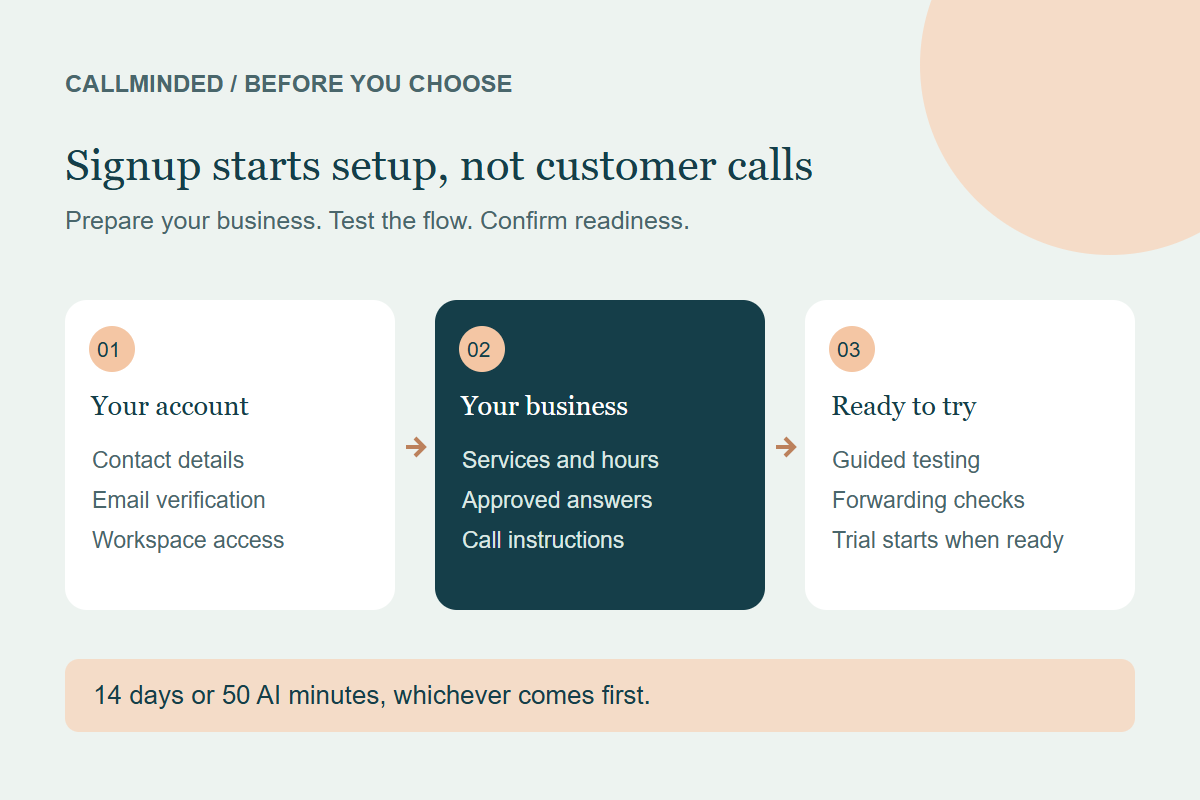
Signing up for CallMinded begins account verification and business setup. It does not immediately forward your customer calls or start the trial clock. Your trial begins when your receptionist is ready to receive calls.
The current offer includes 14 days and 50 AI conversation minutes, with no credit card required. The trial ends at whichever limit comes first. Guided help is included for connecting your number and testing the receptionist. Check the current trial terms before starting.
Step 1: enter your account and contact details
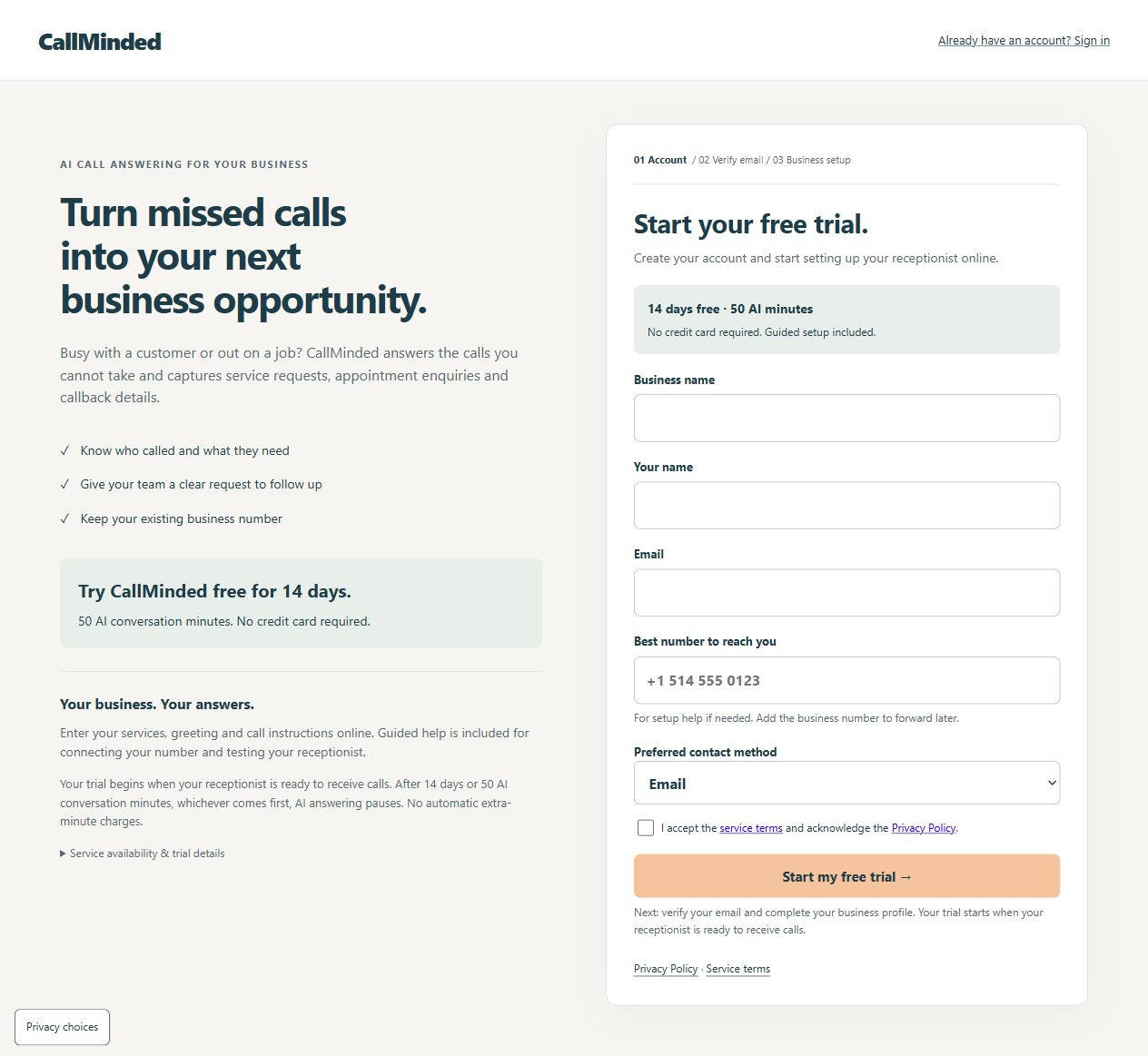
The public signup form asks for your business name, your name, email, best number to reach you and preferred contact method. It also asks you to accept the service terms and acknowledge the privacy policy.
The contact number is for setup help if needed. The form explains that you add the business number to forward later. Use an email inbox you can access, because verification is required before completing account registration.
Step 2: verify your email and choose a password
After submitting the signup form, follow the verification email to finish registration and choose a password that meets the displayed requirements. The interface then directs you into business setup.
If the email does not arrive, check the address you entered and the inbox’s spam folder. The confirmation screen provides options to change the signup email or request another verification email. An email request is not the same as a completed account.
Do not share the verification link or password with someone helping write your business information. The person who owns the account should complete the verification step.
Step 3: prepare the information Josie should use
Enter your services, greeting and call instructions online. Prepare your opening hours and timezone, coverage area, approved answers and the details your staff need in a callback request. Guided setup helps you review the flow before relying on it.
For prices, include the currency, scope, conditions and exclusions together. If a question requires staff assessment, say so. A receptionist should not invent a final quote or confirm an appointment merely because the caller requests one.
| Prepare | Useful example | Avoid |
|---|---|---|
| Service scope | Services you offer and work you do not take. | “We do everything.” |
| Hours and coverage | Timezone, closed days and approved locations. | Conflicting notes or assumed availability. |
| Price conditions | Currency, inclusions and quote-required cases. | A starting price presented as a final total. |
| Intake details | Service, relevant preferences and confirmed callback. | Collecting personal information unrelated to the enquiry. |
The business setup guide explains how to prepare those facts. Start with one ordinary call type rather than trying to cover every possible situation at once.
Step 4: review fictional test calls
Test an ordinary enquiry and the exceptions that matter to your business. Ask about an unlisted service, correct a callback number and request a time staff have not confirmed. Listen to the answer and review what was saved.
For a salon, distinguish a service question from an appointment request. For a cleaning company, distinguish a quote enquiry from a crew booking. Josie currently captures requests for staff confirmation; calendar bookings, dispatch and live transfers are not current capabilities.
If a detail is wrong, correct the business information or intake rule and repeat the same scenario. A smooth greeting alone is not a readiness check. Use the test-call checklist when planning these calls.
Step 5: check the existing-number call path
Guided help covers connecting your number and testing the receptionist. Keeping your business number depends on the forwarding options and setup supported by your phone provider. Check any provider forwarding charges.
A successful call to a direct test line does not prove that customers calling the original business number reach the correct flow. Verify the actual forwarding and fallback before using it for customer calls.
Read the call-forwarding guide for the questions to ask your provider. No business number is automatically forwarded just because you completed account registration.
Step 6: begin the trial when the receptionist is ready
The trial starts when your receptionist is ready to receive calls. It ends after 14 days or 50 AI conversation minutes, whichever comes first. AI answering pauses at the limit, with no automatic extra-minute charges under the current offer.
Assign someone to review enquiries and follow up. During the trial, record usable requests, corrected details and actual staff-confirmed outcomes. Keep fictional tests separate from customer enquiries. The trial scorecard provides a review format.
What signup does not guarantee
Registration does not guarantee immediate phone activation, a specific setup completion time or more sales. Readiness depends on your information, call flow and phone setup. An accurate captured request still needs staff follow-up.
If automatic booking or live transfers are essential, review the current capabilities before signing up. Ask about an unresolved requirement rather than assuming a planned feature is available.
Common questions
Do I need a credit card to start?
No credit card is required for the current free-trial offer.
Does the trial start when I submit the form?
No. Signup begins verification and setup. The trial starts when your receptionist is ready.
Can I keep my business number?
The setup can use forwarding where your provider supports it. Confirm the configuration, charges and fallback during guided setup.
How long does setup take?
There is no fixed completion-time promise here. Prepare your business information and confirm your phone-provider requirements to make the review easier.
Start with guided setup
14-day free trial · 50 AI conversation minutes · No credit card required. Your trial begins when your receptionist is ready to receive calls.
Start my free trial →Keep exploring
Prepare your business information →