The practical answer
An after-hours answering service handles business calls when your team is closed or unavailable. Depending on the provider and your instructions, it can answer approved questions, take messages or collect service requests for follow-up. The important question is what happens after someone answers.
A caller who wants help tomorrow should leave knowing whether they have requested an appointment or actually booked one. Your team should receive enough accurate information to respond without starting the conversation again.
Choose the coverage gap before choosing the service
After-hours answering differs from daytime overflow. Overflow covers calls your staff cannot answer while working. Closed-hours intake covers times when nobody is scheduled to respond. A service that takes an overnight message does not create an on-call team.
Review recent voicemail and missed-call records. Identify useful new enquiries, existing-customer questions and calls that require an immediate human decision. Note when they arrive and who could realistically follow up. Do not assume every missed call represents a lost sale.
| Option | Useful when | Check before choosing |
|---|---|---|
| Voicemail | You need a simple message and can return it reliably. | Does the greeting explain when the team reviews messages? |
| Human answering service | Callers need judgment or an authorized escalation process. | Which hours and actions are included in the agreement? |
| AI answering service | Callers need approved answers and a structured callback request. | Does it preserve corrections and explain its limits? |
For a broader comparison, read IVR versus human and AI receptionists. Choose around your callers’ needs, rather than treating every answering service as interchangeable.
Write an after-hours greeting that sets a realistic expectation
A useful opening identifies the business and AI role, explains the closed-hours situation accurately, and lets the caller state the reason for calling. Avoid a long menu of services before the caller can speak.
Fictional example: “Thanks for calling Cedar Home Services. I’m the AI receptionist. The team is closed right now, but I can answer questions from our business information or collect a request for them to review. How can I help?”
Use closed-hours wording only when the setup correctly applies your opening hours and timezone. A holiday exception can change whether the team is available. Do not promise a callback by a specific time unless your business has approved and can deliver that commitment.
Collect a request your team can act on
For a service enquiry, start with the caller’s own description. Collect their name, confirmed callback number, service location if relevant, and preferred timing. Ask only what the next person needs. An opening-hours question does not need a full customer intake.
If the caller changes their number or requested day, keep the corrected value. If your coverage area excludes their location, follow the approved rule instead of accepting a request that sounds like a promised visit.
For an unfamiliar price or service question, capture the question for staff. An assistant should not estimate from general knowledge or turn “starting at” pricing into a final quote.
Make the closing message match the saved request
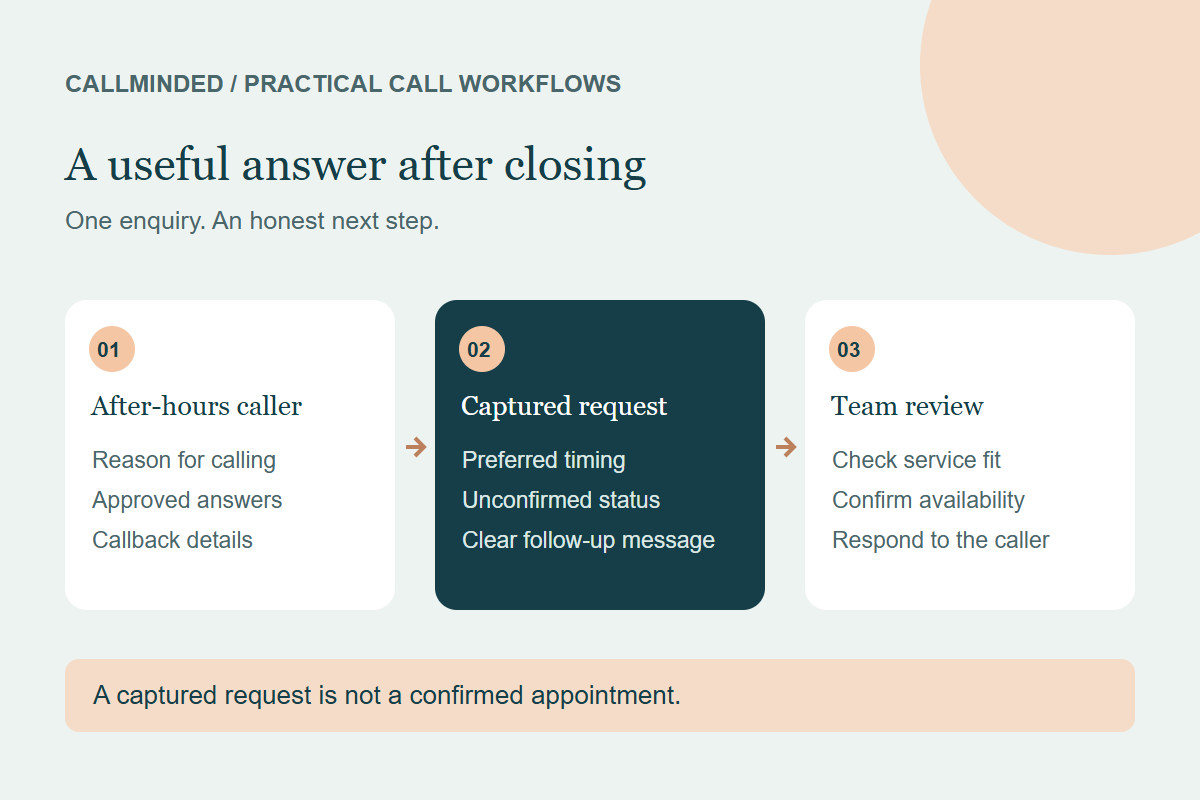
Imagine someone calls a cleaning company at 8 p.m. asking for a move-out clean on Friday. This fictional enquiry could end with: “I’ve recorded your move-out cleaning request and preferred Friday timing. The team will review the details and contact you to confirm whether they can help. This is not a confirmed booking.”
The handoff should then say: move-out clean requested; Friday preferred; contact details confirmed; quote and appointment unconfirmed. If the message says “Friday booking” instead, staff and caller can develop different expectations.
Assign the morning review before calls begin
- Choose the person who reviews overnight requests when the business opens.
- Check the service, location, callback details and any caller-reported urgency.
- Confirm availability and price conditions through your normal business process.
- Respond to the caller and record the actual outcome.
- Keep unresolved requests visible until someone owns the next action.
A dashboard request is the start of follow-up. Separate “captured,” “contacted,” “qualified” and “booked by staff” in your own review. The missed-call workflow guide explains how to organize that handoff.
Test ordinary calls and the exceptions
Use fictional calls for an unlisted service, an out-of-area address, a correction to a phone number and a request for a time the team has not confirmed. Then inspect the saved records. Test the original business number, forwarding and fallback, not only the assistant’s direct test number.
If immediate dispatch or emergency response is essential, require evidence of that capability from the provider. CallMinded captures enquiries and appointment requests for staff review; it does not currently dispatch staff, provide live transfers or confirm calendar bookings. Caller-reported urgency in a dashboard is not an emergency response service.
Compare cost with the follow-up work included
Check included minutes, overages, setup fees, phone-provider forwarding charges and what happens at usage limits. Include staff time reading and returning requests. Measure usable enquiries and follow-up completion without assigning revenue to every message.
Use the answering-service cost worksheet and trial scorecard to compare options consistently.
Common questions
Can an after-hours service confirm appointments?
Some providers can, with suitable calendar access and approval. Others take requests. CallMinded currently collects requests for your team to confirm.
Does answering a call guarantee a new customer?
No. Service fit, pricing, availability and follow-up affect the outcome. Track completed business outcomes separately from captured enquiries.
Can I keep my business phone number?
Call forwarding may allow that, depending on your provider and configuration. Review forwarding charges and test the complete call path.
Start with guided setup
14-day free trial · 50 AI conversation minutes · No credit card required. Your trial begins when your receptionist is ready to receive calls.
Start my free trial →Keep exploring
Explore after-hours answering →