The practical answer
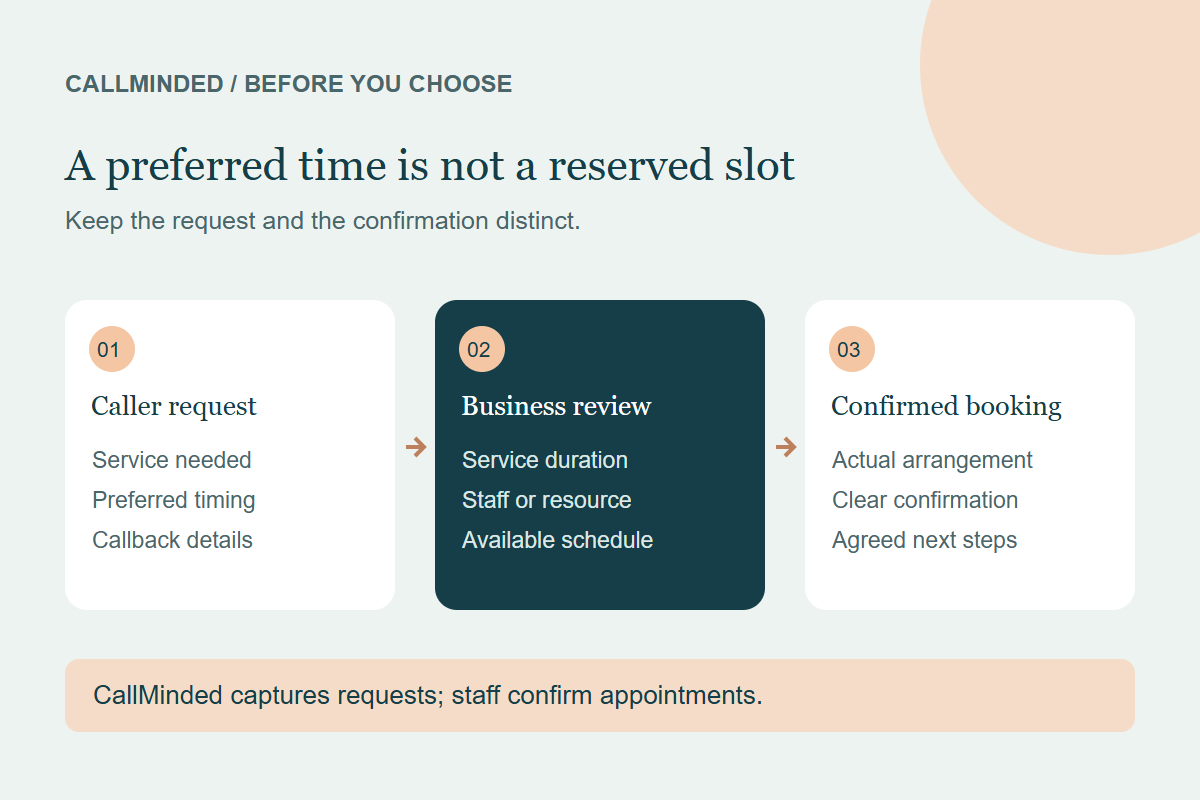
An appointment request records what a caller would like. A confirmed booking means the business has accepted an actual arrangement and communicated it clearly. The difference matters because a caller may plan their day around the words they hear.
“Friday morning preferred” can be a useful request. “You’re booked for Friday morning” is a commitment. A receptionist should not move from one to the other unless it can verify that the booking has actually been arranged.
Use clear names for the stages
| Stage | What it means | What the caller should understand |
|---|---|---|
| Request captured | The service and preferred timing were recorded. | The business still needs to review availability. |
| Under staff review | The team is checking scope, resources or additional details. | A decision or confirmation is still pending. |
| Booking confirmed | The business has arranged the appointment under its process. | The agreed service, date and time or window are clear. |
These are workflow descriptions, not a claim that every provider uses these exact dashboard labels. Use names your staff and callers understand, then keep the spoken message and the record consistent.
Why the service must come before the time slot
A salon colour consultation, a cut and a combined colour-and-cut service may need different durations and professionals. A cleaning enquiry may require a quote before staff assign a crew. A home-service request may need coverage and scope checks.
Collecting the date alone does not resolve those questions. An AI receptionist can prepare a useful request by capturing the service, relevant preferences and contact information. Staff still need the details required to accept the work.
Compare two endings to the same call
Fictional caller: “Can I have a colour and cut with Maya on Saturday?” The receptionist has no verified access to Maya’s schedule.
Unsupported: “You’re booked with Maya on Saturday.”
Suitable for request capture: “I’ve recorded a colour-and-cut request with Maya preferred for Saturday. The salon will review availability and contact you to confirm. This is not a confirmed booking.”
The second ending leaves the caller with a useful next step without implying a reserved slot. It also gives the salon the service, stylist and date to check.
In a real workflow, the assistant should claim that a request was saved only after the save succeeds. If it could not save the information, the closing needs to reflect that failure rather than giving a reassuring but incorrect success message.
What a useful appointment request should contain
- The caller’s reason for calling and service requested.
- Name and confirmed callback details when follow-up is needed.
- Preferred day or time window, marked as unconfirmed.
- Relevant location, stylist or resource preference.
- Questions the team still needs to answer.
- A clear indication that staff confirmation is required.
Keep preferences separate from confirmed facts. A customer saying “I can only do Friday” does not establish Friday availability. Corrected details should replace earlier values before the handoff is saved.
What automatic booking needs to demonstrate
Some providers can connect to scheduling systems and make bookings. Ask them to demonstrate your actual service rules: required duration, staff or resource eligibility, location and approval requirements.
The demonstration should show the appointment in the business’s scheduling system, not only an AI voice saying it was booked. Ask what happens if the slot changes, the system rejects the booking or a staff approval is required. A failed booking should not receive a success confirmation.
A marketing label such as “appointment handling” can describe either intake or confirmed booking. Read the scope and test the action before relying on it.
Where CallMinded fits today
CallMinded’s AI receptionist, Josie, uses approved business information and captures service or appointment requests for staff. It does not currently confirm calendar bookings, dispatch staff or provide live transfers.
Your team reviews the request and confirms the actual arrangement. This can suit businesses that want to keep answering while staff are busy, while retaining their existing approval process. If automatic calendar booking is essential, treat it as a requirement to verify rather than assuming it is available.
See the lead inbox workflow and current product capabilities.
Give staff a short confirmation checklist
- Confirm the service and any assessment required.
- Check duration, staff or crew and available timing.
- Resolve price conditions and outstanding questions.
- Arrange the appointment through your normal process.
- Tell the caller the agreed details and any next steps.
- Record the completed outcome separately from the original request.
If your team cannot meet the requested timing, offer an actual alternative instead of silently treating a preference as confirmed. A caller should not need to infer the appointment status.
Measure requests and bookings separately
Count captured requests, contacted callers, qualified enquiries and staff-confirmed bookings as distinct outcomes. A request that is still awaiting review should remain pending. Internal tests, spam and wrong numbers should not count as new customer appointments.
The trial scorecard helps you review these outcomes. This is a measurement approach, not a promise that every captured caller becomes a customer.
Common questions
Is an appointment enquiry a conversion?
It can be a useful enquiry event, but label it honestly. It is not the same as a qualified customer, confirmed booking or paid job.
Can staff confirm an appointment without a calendar integration?
Yes, through the business’s normal process. The AI should not claim that action occurred before staff actually complete it.
What if someone requests an urgent visit?
Record the caller’s request under your approved process. Requested urgency does not establish availability or dispatch.
Start with guided setup
14-day free trial · 50 AI conversation minutes · No credit card required. Your trial begins when your receptionist is ready to receive calls.
Start my free trial →Keep exploring
Understand live call answering →